
Your first remote job starts on Monday and your kitchen chair already hurts after an hour. Your apartment is small, your budget is tight, and the pictures of perfect home offices online all seem to cost thousands of dollars. That gap between what you have and what you think you need can feel discouraging before you have even started. The good news is that a comfortable place to work does not need a full room, a designer desk, or a brand new set of gadgets. It needs a clear plan, a few smart choices, and the patience to build it in the right order.
Learning how to set up a home office for remote work on a budget is really about learning what matters most. A chair that supports your back matters more than a pretty lamp. A screen at the right height matters more than a second monitor. A quiet corner with a door you can close, even part of the way, matters more than a large desk. When you spend on the right things first and use what you already own for the rest, you can build a setup that feels good to sit in for a full work day and still stay inside a modest budget.
This guide walks through that plan in plain terms. You will see how to choose a spot, how to use furniture you already own, how to fix the two problems that cause most pain, how to set up your tech without buying everything at once, and how to keep the whole project under 300 dollars. You do not need to buy it all in one weekend. You need a place to sit, a place to put your laptop, and a routine that helps you focus and then switch off at the end of the day.
How to Set Up a Home Office for Remote Work on a Budget in a Small Space
The first decision is where you will work. Look for a spot with natural light, a power outlet close by, and enough room for a chair to move without hitting a wall. A corner of a bedroom, a quiet end of a living room, or a wide hallway nook can all work well. A spare room is nice but it is not required. What matters is that the spot is yours during work hours and that you can leave it behind when the day ends.
Try the spot before you buy anything. Sit there with your laptop for an hour and notice what bothers you. Is the light behind you, which makes video calls look dark? Is the chair too low? Is the table too high for your arms? Is there noise from the street or from the kitchen? These small notes become your shopping list. They stop you from buying a gadget you saw online and help you buy the one thing that will actually make your day easier.
Think about boundaries too. If you live with family or roommates, tell them your work hours and agree on simple signals, like headphones on means please do not interrupt. If you live alone, the boundary is with yourself. A clear start time and a clear finish time protect your evenings. A home office works best when it has a beginning and an end, even if the office is only one corner of one room.
Measure before you buy
Measure the space you have before you order a desk or a chair. A tape measure costs almost nothing and it saves you from the cost and trouble of returning furniture that does not fit. Write down the width, the depth, and the height of the spot. Check the width of doorways and stairs as well, because a desk that fits the room still needs to get into the room. Take a photo of the measurements on your phone so you have them with you when you shop.
Choose one spot and keep it
Working from a different place every day sounds flexible, but it makes it hard to focus. Your brain learns that one spot means work time. When you sit in that spot, you settle faster. When you leave it, you relax faster. That simple habit is free, and it is one of the most useful parts of any home office. Pick your spot, set it up once, and let it do some of the work for you.
Start With the Furniture You Already Own
Before you spend a dollar, look around your home. Most people already own half of a home office without knowing it. A sturdy dining table can be a desk. A kitchen chair can work for short sessions while you look for something better. A bookshelf can hold papers and chargers. A tray, a basket, or a shoe box can hold cables and keep them out of sight. Using what you have is not a compromise. It is the fastest way to start working well while you save for the items that matter most.
Walk through your home with fresh eyes and make a list. You need a flat surface at a comfortable height, a seat, a light, and a place to store a few work things. You probably have all four already. Move them into your chosen spot and try working there for two or three days. You will quickly learn which piece needs replacing and which piece is fine as it is. That test saves money because you only replace the weak link, not the whole setup.
Second hand furniture can fill the gaps at a very low price. Check local buy and sell groups, thrift stores, and friends who are moving. A solid wood desk from a thrift store often lasts longer than a cheap new desk made from thin board. Look for stable legs, a flat top, and no wobble. If a chair is second hand, sit in it for ten minutes, lean back, and check that the seat and back feel firm. A small saving here leaves more money for the items that protect your health.
Your Desk and Chair Matter More Than Anything Else

Your desk and chair decide how your body feels at the end of the day. A desk that is too high forces your shoulders up. A chair that is too low forces your knees up. A seat with no back support leaves your lower back tired by lunch. These are not small complaints. They build up over weeks and they make it hard to focus. That is why your chair and your screen height deserve the first money you spend.
Start with your chair. If you can buy one good thing, buy a chair with adjustable height, a firm seat, and a back that supports your lower back. You do not need a luxury model with a dozen levers. You need a seat you can sit in for hours without pain. If a new chair is out of reach right now, add a firm cushion to the seat and a small rolled towel or a lumbar cushion behind your lower back. Those two low cost fixes can turn a kitchen chair into a workable seat for a few weeks while you save.
Your desk height matters just as much. When you sit, your elbows should rest near your sides with your forearms level. Your feet should rest flat on the floor. If your feet dangle, a footrest or a stack of books under your feet can help. If your desk is too high, a lower chair plus a footrest is often cheaper than a new desk. Small adjustments like these cost little and they change how the whole day feels.
Fix your screen height first
The top of your laptop screen should sit near eye level. When a laptop sits flat on a desk, you look down all day and your neck pays the price. A laptop stand, a stack of books, or a sturdy box can lift the screen to the right height. Once the screen is higher, add a separate keyboard and mouse so your hands can stay at a comfortable height. This one change, screen up and hands down, is the single best fix for neck and shoulder pain in a home office.
Keep your arms and wrists relaxed
Your keyboard should sit close to you, with your wrists straight and your shoulders relaxed. If you reach too far forward, your shoulders tense up within minutes. Pull the keyboard closer, keep the mouse at the same level, and take a short stretch break every hour. A cheap wrist rest can help, but good posture and regular movement help more. Stand up, roll your shoulders, and walk to the kitchen for water. Your body was not made to sit still for eight hours.
Build Your Tech Setup Around One Good Screen

You do not need a room full of tech to work remotely. You need a reliable laptop, a stable internet connection, a clear webcam, and sound that other people can hear. Start with what you have and add one item at a time. A second monitor is useful, but it is not the first thing to buy. A good headset and a laptop stand will help you more in your first month than a large screen you cannot yet afford.
Check your internet speed before your first week. Video calls need a steady connection more than a very fast one. Sit in your chosen spot and run a speed test on your laptop and your phone. If the signal is weak in that corner, move closer to the router or use a wired connection if you can. A short network cable costs a few dollars and it can remove the freezing and dropped calls that make remote work stressful.
Sound matters on every call. The microphone built into most laptops picks up room noise and echoes, which makes you hard to hear. A simple wired headset with a microphone costs far less than a fancy wireless set and it usually sounds clearer. Test it with a friend before an important meeting. Good sound makes you seem professional even when your desk is a dining table and your background is a plain wall.
Choose accessories that earn their place
Buy accessories in order of need. A laptop stand and a separate keyboard come first because they protect your neck and wrists. A headset comes next because it protects your calls. A mouse, a desk lamp, and a power strip follow. A second monitor, a webcam, and a docking station can wait until you know how you work and what your job actually needs. Each item should solve a problem you have felt, not a problem you imagine you might have one day.
Keep cables tidy from the start. A tangle of cables under a desk is annoying and it can be a trip hazard. Use a few cable ties, a small box, or clips on the edge of the desk to keep chargers and cables in one place. Label the chargers you use every day. A tidy desk is easier to clean, easier to work at, and easier to pack away if you need the table back for dinner.
Make a Small Space Work for You
A small apartment does not mean a poor home office. It means you need to use vertical space and choose furniture that does more than one job. A shelf above your desk holds books and supplies without taking floor space. Hooks on the wall hold headphones and bags. A folding desk or a desk that fits against a wall can turn an unused corner into a work zone. When the day ends, you can fold it away and get your living space back.
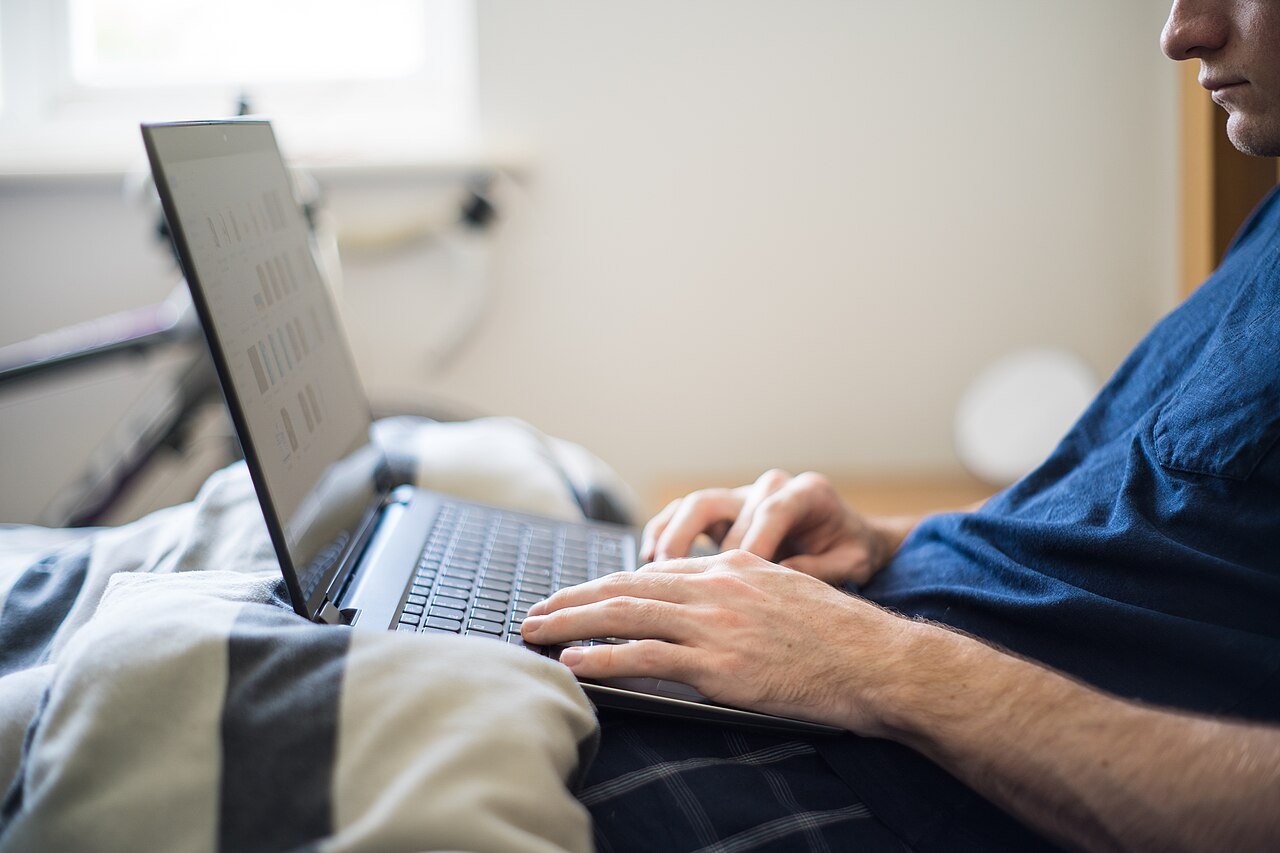
Working from bed or from the sofa feels comfortable for an hour, but it is a poor daily habit. Your back gets no support, your screen sits at the wrong angle, and your brain starts to link your bed with work stress. Sleep suffers and focus suffers too. Keep your bed for rest and your sofa for rest. Do your work at a table, even a small one, and your body and your sleep will thank you.
Storage is the secret to a small home office. You need a place for papers, chargers, notebooks, and the small items that pile up on a desk. A single drawer, a shelf, or a basket on the floor can be enough. Put away what you do not need today and keep only the tools for the current task on the desk. A clear desk helps a clear mind, and in a small space it also makes the room feel larger.
Use light and sound to your advantage
Natural light is free and it helps your mood and your video calls. Sit facing a window or with a window to your side, not behind you. If your room is dark, a simple desk lamp with a warm bulb can make a big difference. Avoid harsh light from above, which creates shadows on your face during calls. A lamp you can move and tilt is more useful than a bright ceiling light.
Noise is the other challenge in a small home. Headphones help, but so do simple habits. Close the door during calls. Put a rug on a hard floor to soften echoes. Keep a fan or a white noise app running at a low level if street noise breaks your focus. You do not need a soundproof room. You need enough quiet to hear and be heard, and enough calm to think.
Plan Your Day So the Space Works Harder
A good setup needs a good routine. Start each day by writing down the three tasks that matter most. Keep that list where you can see it, on paper or on your screen. Work on the hardest task first, while your energy is fresh. Take a proper lunch break away from your desk. End the day by tidying the desk and writing the first task for tomorrow. These small habits make a modest setup feel like a real office.
Planning your time is just as important as planning your furniture. A simple way to prioritize tasks can keep a busy day from turning into a long list of small jobs that never ends. When you sort work by what is urgent and what is important, you spend less time reacting and more time finishing the work that counts. That calm approach also helps you leave work on time, which is easy to forget when your office is ten steps from your sofa.
Your tools can help you work faster once the basics are in place. Voice typing can help you write faster when you need to draft emails, notes, or a long document without typing every word. It is a good fit for a budget setup because it uses software you may already have and it saves your wrists on long writing days. Try it for short drafts first and keep it for the tasks where it truly saves time.
Keep Your Papers and Files in Order
Remote work creates paper and files fast. Bills, notes, contracts, and receipts pile up on a small desk and then they pile up on your computer too. Give every paper a home the day it arrives. A folder for work, a folder for money, and a folder for personal papers is enough to start. Scan the papers you need to keep and recycle the rest. A clear desk at the end of the day is a gift to yourself the next morning.
Your digital files need the same care. When files live in five places with five names, you waste time searching and you risk losing work. A simple digital filing system can keep your documents in one place with clear names and folders you can find in seconds. Set it up once, use the same names every time, and back up your most important files. Good organisation is free, and it makes a small home office feel calm and professional.
At the end of each week, spend ten minutes on upkeep. Clear the desk, empty the bin, charge your devices, and check your list for next week. This short weekly reset stops clutter from building up and it gives you a clean start on Monday. It is a small habit, but it is the habit that keeps a budget setup working well for months, not just for the first week.
A Simple 300 Dollar Plan That Covers the Basics
You can build a workable home office for under 300 dollars if you spend in the right order. The plan below assumes you already own a laptop and a table. It puts money into comfort and sound first, then into the extras that make the day smoother. Prices vary by store and by city, so treat these as a guide, not a fixed quote. Shop for sales, check second hand options, and buy one item at a time.
- Chair support and comfort, 80 to 100 dollars, for a lumbar cushion, a seat cushion, or a good second hand office chair
- Laptop stand plus a separate keyboard and mouse, 50 to 70 dollars, to lift your screen and protect your neck and wrists
- Headset with a clear microphone, 30 to 50 dollars, for calls that sound professional
- Desk lamp and a power strip, 25 to 35 dollars, for good light and safe charging
- Storage and cable care, 15 to 25 dollars, for a basket, a shelf, cable ties, and a notebook
- Small extras and a buffer, 20 to 30 dollars, for a water bottle, a footrest, or a plant
Add those items together and the total stays near 250 to 300 dollars, depending on what you find on sale. If your budget is lower, start with the laptop stand and the chair support, then add the headset next month. If you already own a good chair, move that money to a second monitor or a better headset. The order matters more than the exact total. Spend on your body first, then on your calls, then on comfort.
Keep your receipts and note what you bought and why. If an item does not help, return it while you can and try a different option. A budget setup is not about buying the cheapest version of everything. It is about buying the right version of the few things that matter, and skipping the rest until you truly need them.
Build the Habit That Makes It Last
A home office is a habit as much as a place. Get up at the same time, get dressed for work, and sit down at your desk with a clear plan. Take breaks away from the screen. Stretch, drink water, and step outside for a few minutes. When the work day ends, close the laptop, tidy the desk, and leave the space. That closing ritual tells your brain that work is done, even when work and home share the same address.
Ask for help when you need it. If your chair hurts your back after a week, change it. If your internet drops during calls, call your provider or move the router. If your eyes feel tired, check your screen brightness and your light. Small fixes made early stop small problems from becoming daily pain. A budget setup works when you keep improving it in small steps, not when you buy it all at once and hope for the best.
Conclusion
Learning how to set up a home office for remote work on a budget is a practical skill, not a shopping trip. Choose one clear spot, use the furniture you already own, spend first on your chair and your screen height, and add tech in order of need. Keep the space tidy, plan your day with care, and build the whole project inside a simple 300 dollar plan. You do not need a perfect room to do good work. You need a comfortable seat, a screen at eye level, clear sound, and a routine that lets you focus during the day and rest when the day ends.
Start today with what you have. Measure your space, move a table into a quiet corner, lift your laptop on a stack of books, and work there for a few days. Notice what helps and what hurts, then buy the one item that will help most. Add the next item when you can afford it. In a few weeks you will have a home office that fits your space, fits your budget, and fits the way you actually work. That is the real goal, and it is well within reach.
Frequently Asked Questions
How much does a budget home office cost?
A workable home office can cost under 300 dollars if you already own a laptop and a table. Spend first on chair support and a laptop stand, then on a headset and a lamp. Buy in priority order and add extras later when you can afford them.
Do I need a separate room for a home office?
No, you do not need a separate room. A quiet corner of a bedroom or living room can work well. Choose a spot with light and a power outlet, keep it tidy, and use it only for work so your brain learns that the spot means focus time.
What is the most important item to buy first?
Buy chair support and screen height first. A lumbar cushion or a better chair protects your back, and a laptop stand plus a separate keyboard lifts your screen to eye level. These two fixes prevent most neck and back pain in a home office.
Can I work from a laptop alone without extra gear?
Yes, you can start with a laptop alone for a short time. Lift the screen on books, use a separate keyboard if you have one, and take regular breaks. Extra gear helps over a full work day, but it is not required on day one.
How do I stay focused in a small apartment?
Set clear work hours, keep your desk tidy, and use headphones as a signal that you are working. Plan three main tasks each morning and take proper breaks away from your desk. A simple routine helps you focus even when your office shares space with your home.